

Send now and Schedule work the way you’d expect. The two newer options have settings worth knowing about.
Before you send, the audience panel shows who will receive the email, not just the audience size: for example “3 contacts, 1 will receive it (2 unsubscribed)”. Unsubscribed, suppressed, and undeliverable contacts are always skipped. If nobody in the audience can receive the email, Send now is blocked and tells you why; a scheduled send is still allowed, in case the audience fills before it goes out.
From an agent, the
send_email MCP tool and brew-cli emails send take the same options except Intelligent send, which is app-only. scheduledAt schedules and gradualSend ramps, on the MCP tool and on POST /v1/sends from code.
Intelligent Send
Intelligent send delivers inside one or more time windows instead of at a single moment. Pick a preset (Morning commute, Mid-morning, Lunch break, Early afternoon, Post-work, Evening), or set your own window with the timeline and time fields. For example, 09:00 to 11:00. Click Add window to deliver across more than one window; recipients are spread across all the windows you set. If a window has already passed today, those recipients get the email tomorrow instead. Windows follow the timezone in the Times in selector, not your own. For example, a 09:00 to 11:00 window in America/New York lands mid-morning for an East Coast audience. It doesn’t matter where you are when you hit send.Per-Recipient Intelligence
Intelligent send includes a Per-recipient intelligence toggle. Turn it on and Brew sends to each contact at their usual open time, based on their engagement history. Contacts without enough history use your windows, same as a regular intelligent send. The send option is app-only, but the open-time profile it reads is not. A contact read withinclude=openProfile returns when that contact opens and their best send time: GET /v1/contacts/{email}, brew-cli contacts get --include openProfile, or search_contacts with include: ["openProfile"] over MCP. See The Open-Time Profile.
Gradual Send
Gradual send ramps up daily volume instead of delivering to the whole audience at once. Use it to warm up a domain that’s newly verified or has been sending at low volume. It works for your regular marketing and customer sends, so you don’t need a dedicated warmup campaign to build reputation. You control the ramp with four settings:- Start: begin right away or pick a date and time for the ramp to start.
- Starting volume: how many emails go out on day one. Brew recommends 50.
- Increment: how much the daily volume grows. The recommended 1.25x grows volume 25% each day.
- Safety threshold: when Brew should pause the send. The recommended Balanced threshold pauses if bounces exceed 3% or complaints exceed 0.07%. You get an alert if sending pauses, so you can investigate before resuming.
When You Launch an Automation
Launching a manual-audience automation run goes through a similar picker with three options: Run now, Schedule, and Gradual send. Intelligent send isn’t offered for automation runs; timing inside a flow comes from its Wait steps.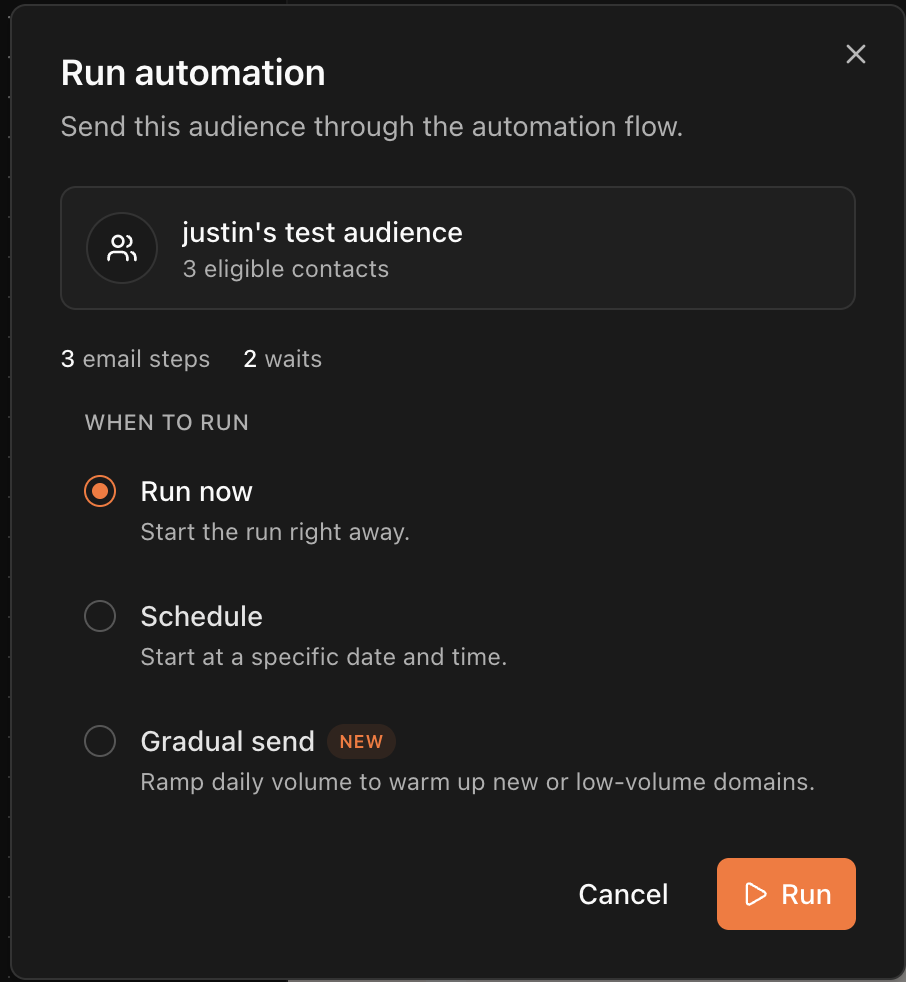
Triggered Sends Skip the Picker
An automation fired by a trigger sends when the event arrives. There is no timing option, because the timing is the event. That covers transactional mail. A password reset or a receipt goes out on the fire, from a transactional-purpose domain, with no unsubscribe link. Delay inside a triggered flow comes from its Wait steps.Need Help?
Our team is ready to support you at every step of your journey with Brew. Choose the option that works best for you:- Self-Service Tools
- Talk to Our Team
Search Documentation
Type in the “Ask any question” search bar at the top left to instantly find relevant documentation pages.
ChatGPT/Claude Integration
Click “Open in ChatGPT” at the top right of any page to explore it further with ChatGPT or Claude.