> ## Documentation Index
> Fetch the complete documentation index at: https://docs.brew.new/llms.txt
> Use this file to discover all available pages before exploring further.
# Contact Deliverability Validation
> Check any address before you send. Each contact comes back valid, risky, or invalid, and the verdict is saved. Five ways to run it: from an audience, on CSV import, over MCP, on a single contact, or on the API.
**July 2026** · Available on all plans.
## What Shipped
Brew can now run a real deliverability check on your contacts before an email goes out. Each address comes back **valid**, **risky** (role account, disposable, or catch-all), or **invalid**, with a machine-readable `reason` and a `didYouMean` typo correction. The verdict is saved on the contact, so a list you validated stays validated.
There are five ways to run a validation: from an audience, on a CSV import, over MCP, when adding a single contact, and on the Public API. Each checked address costs **2 credits**, charged only on success.
## From an Audience
The most credit-efficient way to validate. Open the audience, then click the three-dot menu in the top right corner of the audience view (next to **Download CSV**) and choose **Validate contacts**. Every contact in that audience is checked.
You can validate your whole list from the All contacts view, but for better credit usage, [create an audience](/audience/create-audiences) first and validate that group instead. Two credits per address adds up; validating the segment you're about to send to is usually all you need.
## Importing a CSV
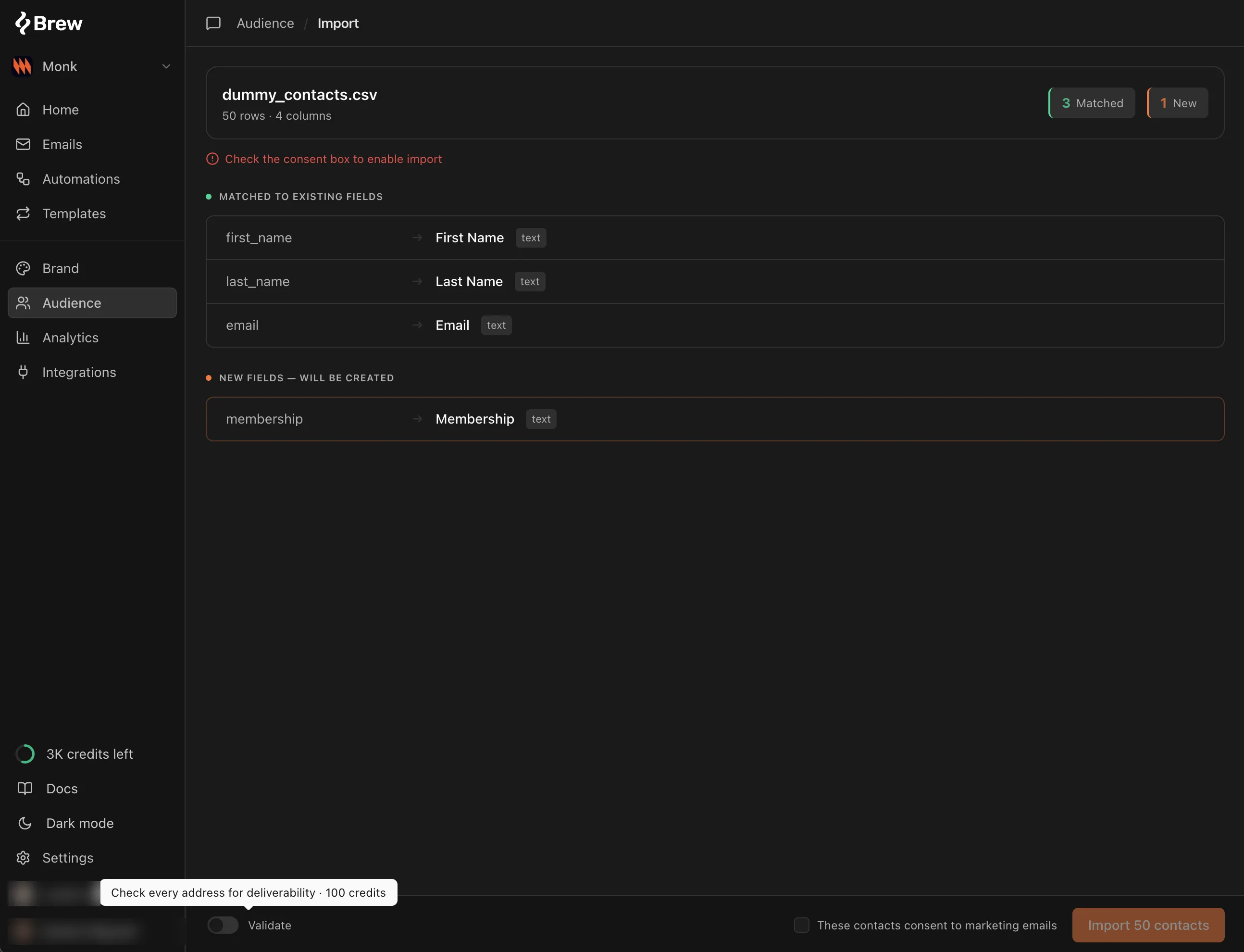
The CSV import has a validation checkbox. Tick it and every address in the file is deliverability-checked as it's ingested.
 ## From MCP
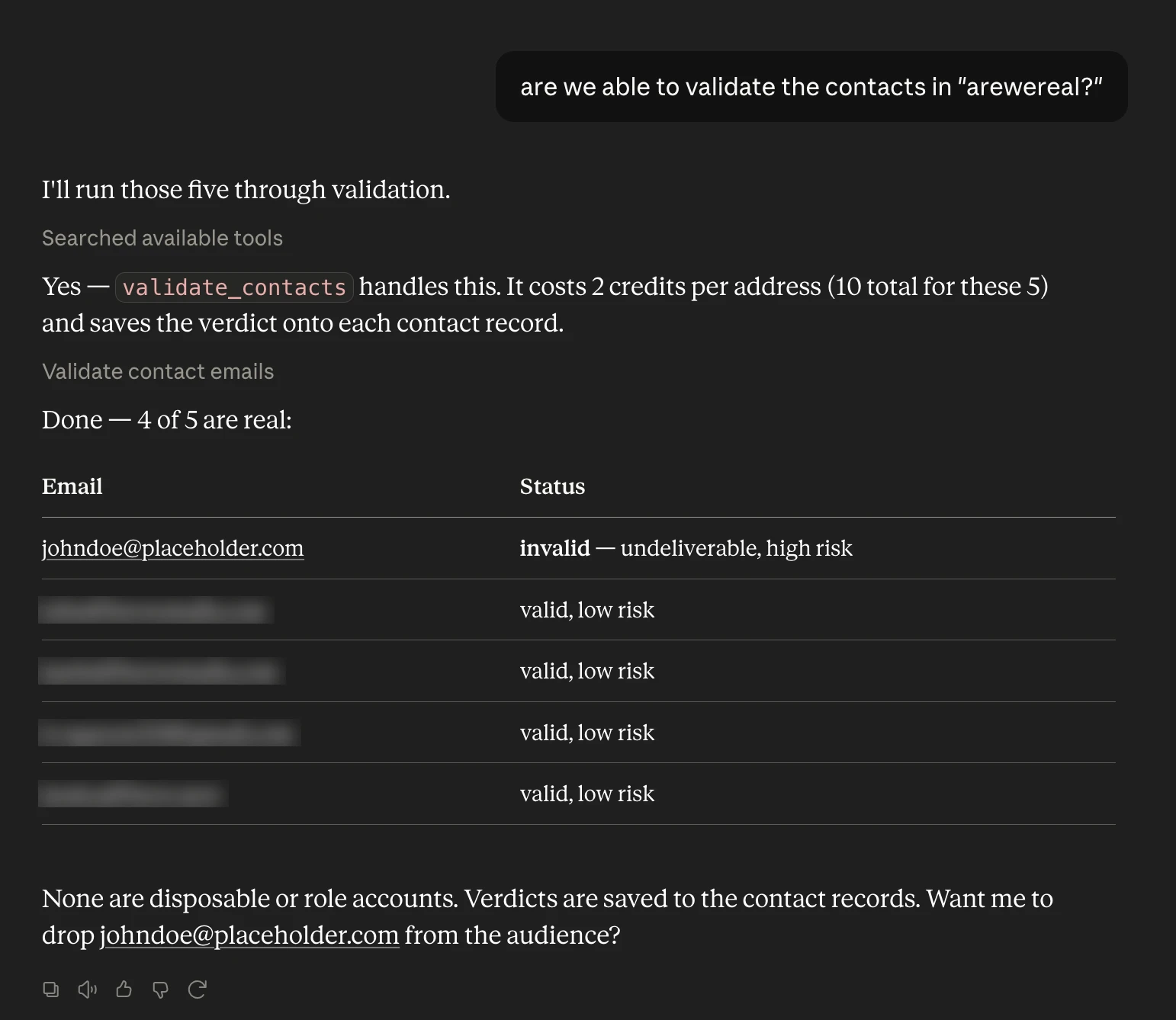
If Brew is [connected to your AI client](/api-reference/mcp/quickstart), the easiest flow is to ask for your audiences, pick one, and validate it:
> *"List my audiences."*
> *"Validate the contacts in the newsletter audience."*
The agent calls `list_audiences` and then `validate_contacts`, and replies with the verdict counts and the addresses that came back risky or invalid. The `create_contact` and `import_contacts_csv` tools take the same opt-in validation as the UI checkboxes.
## From MCP
If Brew is [connected to your AI client](/api-reference/mcp/quickstart), the easiest flow is to ask for your audiences, pick one, and validate it:
> *"List my audiences."*
> *"Validate the contacts in the newsletter audience."*
The agent calls `list_audiences` and then `validate_contacts`, and replies with the verdict counts and the addresses that came back risky or invalid. The `create_contact` and `import_contacts_csv` tools take the same opt-in validation as the UI checkboxes.
 ## Adding a Contact Manually
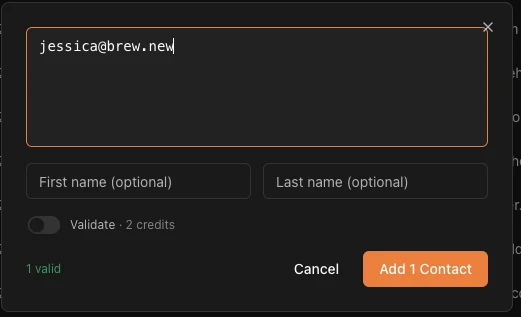
The add-contact form has the same checkbox. Tick it and the address is checked as it's saved.
## Adding a Contact Manually
The add-contact form has the same checkbox. Tick it and the address is checked as it's saved.
 ## From the API
The same check is available on three endpoints:
* **`POST /v1/contacts/validate`** checks up to 100 addresses at once and now **writes the verdict back** onto matching contacts. Each result carries `risk`, `isDisposable`, and `isRole` signals alongside `reason` and `didYouMean`.
* **`POST /v1/contacts`** and **`POST /v1/contacts/import-csv`** accept an optional **`validate: true`** to check each address as it's ingested. Up to 100 addresses validate inline; larger submissions upsert first and validate as a background job, returning a `validationJobId`.
In the TypeScript SDK it's `brew.contacts.validate(...)`, and the ingestion methods take the same `validate` flag. The contact's verdict field is named `validationStatus` (renamed from `verificationStatus`, which is still emitted with the same value for back-compat). See the [API Changelog](/changelog/api) for the full details.
## How the Credits Work
Validation draws from the same credit balance as AI email generation; there is no separate pool to top up. Each checked address costs a fixed **2 credits**, charged only on success: if the check can't complete, the call returns a retryable `503` and you are not billed. See [Credits](/api-reference/api/credits) for how metering works and how to check your balance.
## Related
* [Add Contacts](/audience/add-contacts)
* [Manage Contacts](/audience/manage-contacts)
* [Create Audiences](/audience/create-audiences)
* [Audience Hygiene](/audience/audience-hygiene)
## From the API
The same check is available on three endpoints:
* **`POST /v1/contacts/validate`** checks up to 100 addresses at once and now **writes the verdict back** onto matching contacts. Each result carries `risk`, `isDisposable`, and `isRole` signals alongside `reason` and `didYouMean`.
* **`POST /v1/contacts`** and **`POST /v1/contacts/import-csv`** accept an optional **`validate: true`** to check each address as it's ingested. Up to 100 addresses validate inline; larger submissions upsert first and validate as a background job, returning a `validationJobId`.
In the TypeScript SDK it's `brew.contacts.validate(...)`, and the ingestion methods take the same `validate` flag. The contact's verdict field is named `validationStatus` (renamed from `verificationStatus`, which is still emitted with the same value for back-compat). See the [API Changelog](/changelog/api) for the full details.
## How the Credits Work
Validation draws from the same credit balance as AI email generation; there is no separate pool to top up. Each checked address costs a fixed **2 credits**, charged only on success: if the check can't complete, the call returns a retryable `503` and you are not billed. See [Credits](/api-reference/api/credits) for how metering works and how to check your balance.
## Related
* [Add Contacts](/audience/add-contacts)
* [Manage Contacts](/audience/manage-contacts)
* [Create Audiences](/audience/create-audiences)
* [Audience Hygiene](/audience/audience-hygiene)